
微信公眾平臺開發(8)--微信公眾平臺接入完整例項
阿新 • 來源:網路 • 發佈:2022-12-18
1. 前言
寫到本文,我們已經完成了驗證伺服器有效性、驗證微信訊息合法性、自定義選單介面呼叫。本篇給出一個專案的完整例項,便於大家搭建完整開發環境。
2. 構建專案
建立Maven專案,然後編寫pom.xml檔案,pom.xml檔案確定了,Maven專案也就確定了。其實此處可以不用SpringBoot模板來建立SpringBoot專案,因為只要在pom.xml裡面配置好了,Maven自動構建一個SpringBoot型別的專案。
<project xmlns="http://maven.apache.org/POM/4.0.0"
	xmlns:xsi="http://www.w3.org/2001/XMLSchema-instance"
	xsi:schemaLocation="http://maven.apache.org/POM/4.0.0 https://maven.apache.org/xsd/maven-4.0.0.xsd">
	<modelVersion>4.0.0</modelVersion>
	<parent>
		<groupId>org.springframework.boot</groupId>
		<artifactId>spring-boot-starter-parent</artifactId>
		<version>2.2.5.RELEASE</version>
		<relativePath /> <!-- lookup parent from repository -->
	</parent>
	<groupId>cn.pandabrother</groupId>
	<artifactId>wx-server</artifactId>
	<version>0.0.1-SNAPSHOT</version>
	<packaging>war</packaging>
	<properties>
		<project.build.sourceEncoding>UTF-8</project.build.sourceEncoding>
		<project.reporting.outputEncoding>UTF-8</project.reporting.outputEncoding>
		<java.version>1.8</java.version>
		<maven-jar-plugin.version>3.0.0</maven-jar-plugin.version>
	</properties>
	<dependencies>
		<dependency>
			<groupId>org.springframework.boot</groupId>
			<artifactId>spring-boot-starter-web</artifactId>
		</dependency>
		<dependency>
			<groupId>org.projectlombok</groupId>
			<artifactId>lombok</artifactId>
		</dependency>
		<dependency>
			<groupId>org.springframework.boot</groupId>
			<artifactId>spring-boot-devtools</artifactId>
		</dependency>
		<!-- 微信公眾號 -->
		<dependency>
			<groupId>com.github.binarywang</groupId>
			<artifactId>weixin-java-mp</artifactId>
			<version>4.1.0</version>
		</dependency>
	</dependencies>
	<build>
		<plugins>
			<plugin>
				<groupId>org.springframework.boot</groupId>
				<artifactId>spring-boot-maven-plugin</artifactId>
			</plugin>
		</plugins>
	</build>
</project>
3. 編寫配置檔案
編寫application.yml配置檔案,用於給專案提供基本配置資訊:
server:
   port: 80 #埠
   servlet:
      context-path: /wx-server
通過該配置檔案,我們的專案就會監聽80埠的請求,且專案訪問的根路徑為/wx-server,這與我們在微信後臺配置的伺服器地址(URL)是一致的。
4. 編寫啟動類
啟動類按照SpringBoot規範寫一個即可:
/**
 * SpringBoot啟動類
 */
@SpringBootApplication
public class WxServerApplication {
	public static void main(String[] args) {
		SpringApplication.run(WxServerApplication.class, args);
	}
}
5. 編寫配置類
配置類其實是關鍵核心,我們需要配置兩個關鍵元件:WxMpDefaultConfigImpl型別的元件用於儲存微信公眾平臺的引數,WxMpService型別的元件用於提供微信公眾平臺開發響應的服務。
/**
 * 微信公眾平臺配置
 */
@Configuration
public class WxMpConfig {

	@Bean
	public WxMpDefaultConfigImpl wxMpDefaultConfigImpl() {
		WxMpDefaultConfigImpl config = new WxMpDefaultConfigImpl();
		config.setAppId(""); // 設定微信公眾號的appid
		config.setSecret(""); // 設定微信公眾號的app corpSecret
		config.setToken(""); // 設定微信公眾號的token
		config.setAesKey(""); // 設定微信公眾號的EncodingAESKey
		return config;
	}

	@Bean
	public WxMpService wxMpService() {
		WxMpService wxMpService = new WxMpServiceImpl();// 實際專案中請注意要保持單例,不要在每次請求時構造例項,具體可以參考demo專案
		wxMpService.setWxMpConfigStorage(wxMpDefaultConfigImpl());
		return wxMpService;
	}
}
6. 編寫自定義選單控制器類
我們通過控制器暴露介面,呼叫介面可以完成自定義選單的建立、查詢、刪除功能。
注意該類使用@RestController描述,是為了將返回值序列化為json格式,便於檢視。
/**
 * 自定義選單
 */
@RestController
public class MenuController {
	@Autowired
	private WxMpService wxMpService;

	/**
	 * 獲取自定義選單
	 */
	@RequestMapping("/menuGet")
	public WxMpMenu menuGet() throws WxErrorException {
		WxMpMenu wxMpMenu = wxMpService.getMenuService().menuGet();
		return wxMpMenu;
	}

	/**
	 * 刪除自定義選單
	 */
	@RequestMapping("/menuDelete")
	public boolean menuDelete() throws WxErrorException {
		wxMpService.getMenuService().menuDelete();
		return true;
	}

	/**
	 * 建立自定義選單
	 */
	@RequestMapping("/menuCreate")
	public boolean  menuCreate() throws WxErrorException {
		// 選單
		List<WxMenuButton> buttons = new ArrayList<WxMenuButton>();
		WxMenuButton btn1 = new WxMenuButton();
		btn1.setType("click");
		btn1.setName("查詢城市");
		btn1.setKey("QUERY_CITY");
		WxMenuButton btn2 = new WxMenuButton();
		btn2.setType("view");
		btn2.setName("跳轉網頁");
		btn2.setUrl("http://www.csdn.net");
		buttons.add(btn1);
		buttons.add(btn2);
		// 建立
		WxMenu wxMenu = new WxMenu();
		wxMenu.setButtons(buttons);
		String re= wxMpService.getMenuService().menuCreate(wxMenu);
		System.out.println(re);
		return true;
	}
}
8. 編寫接入驗證控制器
我們在微信公眾平臺後臺配置的伺服器URL配置如下:
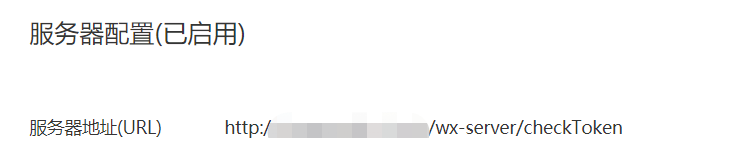
所以我們編寫控制器類, 監聽
/checkToken路徑的請求。由於引數比較多,我們直接通過HttpServletRequest接收引數。
/**
 * 接入驗證控制器
 */
@Controller
public class CheckController {
	@Autowired
	private WxMpService wxMpService;

	// 接入驗證
	@GetMapping("/checkToken")
	@ResponseBody
	public String checkTokenGet(HttpServletRequest request) {
		System.out.println("接入驗證");
		String signature = request.getParameter("signature");
		String timestamp = request.getParameter("timestamp");
		String nonce = request.getParameter("nonce");
		String echostr = request.getParameter("echostr");
		if (!wxMpService.checkSignature(timestamp, nonce, signature)) {
			// 訊息不合法
			return "訊息不合法";
		}
		// 訊息合法
		return echostr;
	}

	// 訊息合法驗證
	@PostMapping("/checkToken")
	@ResponseBody
	public String checkTokenPost(HttpServletRequest request) {
		System.out.println("訊息合法驗證");
		String signature = request.getParameter("signature");
		String timestamp = request.getParameter("timestamp");
		String nonce = request.getParameter("nonce");
		if (!wxMpService.checkSignature(timestamp, nonce, signature)) {
			// 訊息不合法
			return "訊息不合法";
		}
		// 訊息合法則繼續處理
		return "";
	}
}
解釋下返回值的問題,此處返回的是字串,這是根據微信官方的要求返回的。微信接受到返回值後,會根據具體的資料約定再進一步處理。
9. 小結
本篇給出了一個接入的完整示例,後續我們在該專案的基礎上陸續完善各項功能即可。